
|
Pulmonary Medicine Associates Link Page |

|
Internal Use Only |


|
Issues with Sutter File Link |


|
Symptoms- When attempting to open a File Link document within Sutter Link you receive a Application Blocked message similar to the one below.
Note: You may want to print this page for reference as you must have Internet Explorer completely shut down for the changes to take affect.
1. Open your computers Control Panel under the Start Menu.
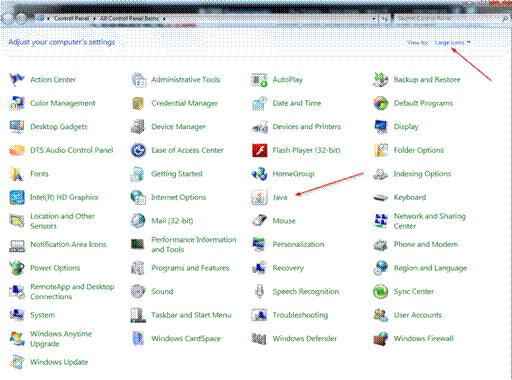
2. Change your view to Large Icon, and select Java.
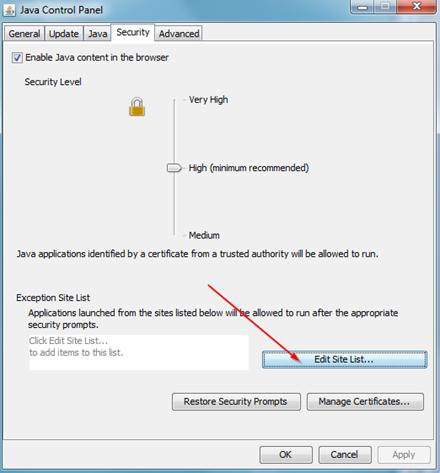
3. Within the Java Control Panel’s Security tab, select Edit Site List
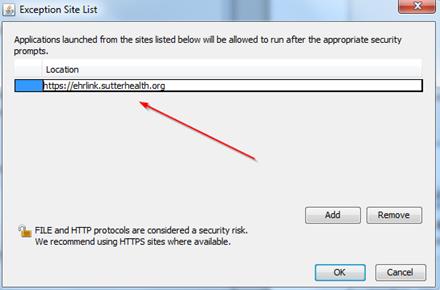
4. Add the following: https://ehrlink.suterhealth.org
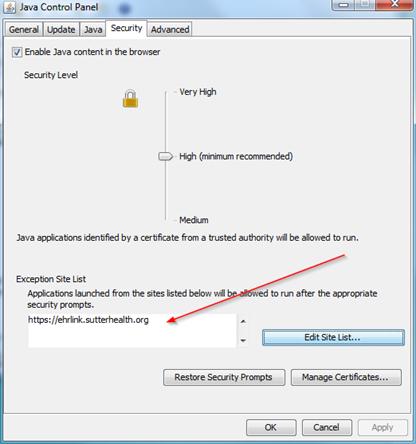
5. Verify the exception has been added.
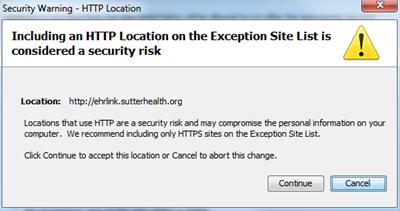
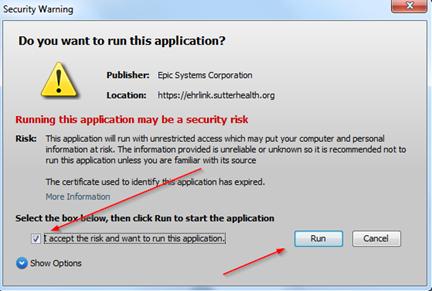
6. Finish by selecting OK and close out of Java and Control Panel. Next launch Internet Explorer and test by accessing Sutter Link and choosing a FileLink object. You will still receive the following warning messages, simply select continue and (accept the risk) and run.
|